

Imagine yourself on a wild adventure across an unknown sea in a tiny boat. It’s a little scary but also exciting. This is kind of like when a new business launches its very first product, called a Minimum Viable Product (MVP). Startups use MVPs to test out their ideas and see if they work without spending too much money upfront, just like exploring the vast ocean with limited resources.
Bubble.io is a boon for startups. This platform helps people who aren’t tech experts build websites and apps without writing a line of coding. With Bubble.io’s easy-to-use tools and features, creating an MVP becomes a breeze. This means startups can bring their ideas to life quickly and enjoy the current market opportunities.
As we delve deeper into Bubble.io, we’ll explore how this platform can be used to build, test, and iterate an MVP efficiently, giving startups the agility they need to succeed in today’s competitive environment.
Why choose Bubble.io for MVP development?
Bubble.io is a no-code builder that was started as a platform to help people create web applications without needing to write code. The main idea behind Bubble.io is to make app development accessible to everyone, even if they don’t know how to code. This makes it ideal for entrepreneurs, startups, and small businesses looking to build their ideas quickly and affordably.
The key features of the platform include:
Visual editor
Bubble.io uses a drag-and-drop interface to build web pages, making it easy to design without any coding knowledge.
Database management
You can create and manage databases directly within Bubble.io, which allows you to store and retrieve data seamlessly.
Workflow automation
Bubble.io lets you set up workflows, which are sequences of actions that happen in response to user interactions, such as clicking a button or submitting a form.
Responsive design
The platform ensures that your web application looks good on all devices, including desktops, tablets, and smartphones.
Plugin support
Bubble.io offers a variety of plugins to extend the functionality of your app, such as payment gateways, social media integrations, and more.
Not sure where to start? Book a free consultation with our no-code experts to learn.
Bubble.io MVP development
No-Code development
Bubble.io allows you to build an MVP (Minimum Viable Product) without writing any code. This is great for validating your business idea quickly and at a low cost.
Best website platform for small businesses
It’s perfect for small businesses because it reduces the need for expensive developers and long development cycles.
Speed and flexibility
You can rapidly iterate and make changes to your app, which is crucial in the early stages of product development.
Cost-effective
By eliminating the need for a development team, Bubble.io significantly lowers the cost of getting your product to market.
Preparing to build your MVP
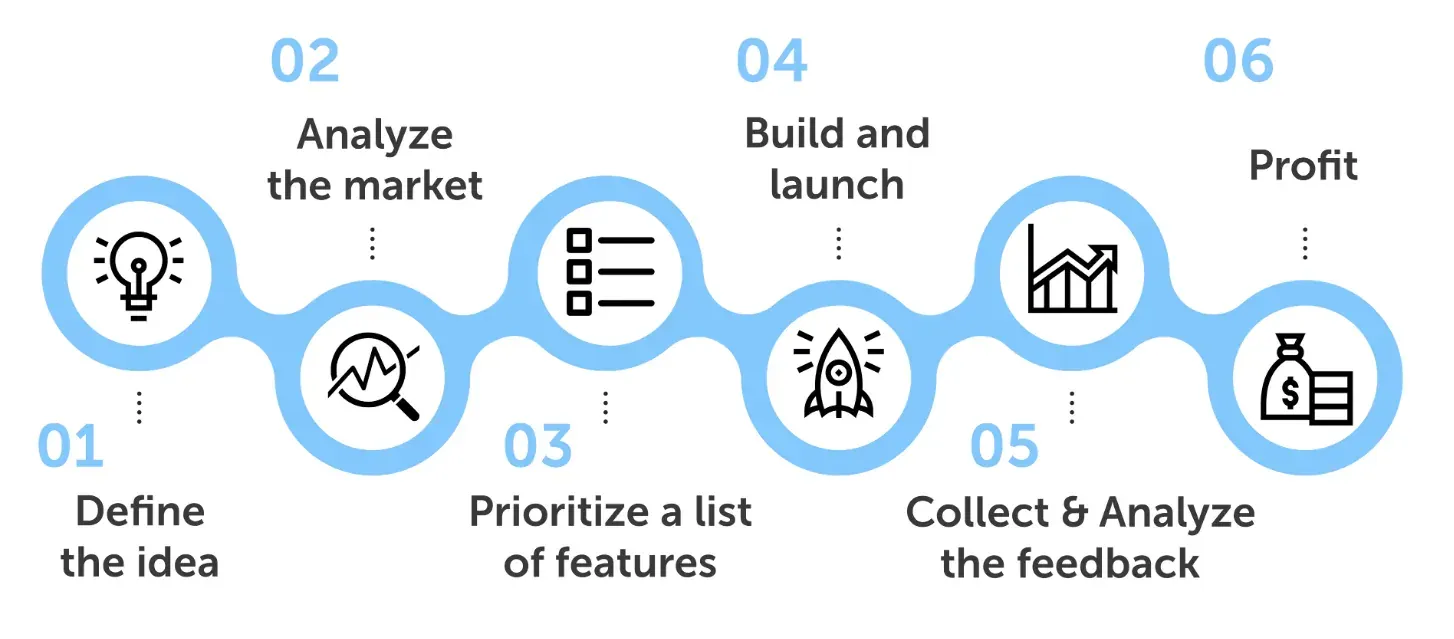
When you’re getting ready to build your MVP, it’s essential to follow a structured approach to maximise your chances of success. An MVP is a simplified version of your product that includes only the most crucial features, allowing you to test your concept quickly and gather valuable user feedback. This process involves three key steps: idea validation, designing the user experience, and planning features.
Idea validation
Before developing your MVP, it’s crucial to validate your startup idea. This means ensuring there’s a real need for your product. Conduct surveys, interviews, and market research to gather feedback. Validating your idea helps you avoid wasting time and resources on a product that might not be in demand. This step ensures that your product resonates with potential users and addresses a real problem.
Designing the user experience
Designing a user-friendly experience is vital. Focus on your target users and their needs. Create simple, intuitive interfaces that make it easy for users to navigate your app. Use wireframes and prototypes to test your design with real users and gather feedback. Keep the design clean and avoid unnecessary features that might complicate the user experience. A well-designed user experience can significantly enhance user satisfaction and engagement.
Planning features
When planning your MVP, decide which features are essential. Start with the core functionality that solves the main problem for your users. Avoid adding extra features that are not critical at this stage. Prioritise features based on user feedback and business goals. This approach helps you build a functional product quickly and allows you to test and improve it based on real user interactions. Focusing on essential features ensures that you deliver value to users from the start and can iterate based on their feedback.
Step-by-step guide to using Bubble.io
With Bubble.io, you can build an MVP (Minimum Viable Product) without writing any code. Here’s a detailed step-by-step guide to get you started on Bubble.io.
Setting up an account and starting a new project
Sign up
Go to the Bubble.io website and click on “Get Started For Free” to create an account. You can sign up using your email address or log in with your Google account.
Create a new project
After logging in, click on the “New App” button. A window will pop up asking for your app name and a brief description. Enter the details and click “Create a new app.”
Choose a plan
Bubble.io offers various pricing plans. You can start with the free plan, which has basic features, and upgrade later if needed. Select the free plan to begin with.
Utilising templates and customising your app
Choose a template
Bubble.io provides a range of templates for different types of applications, such as marketplaces, social networks, and more. Browse through the available templates and choose one that closely matches your project needs. Click “Use this template” to start with the selected template.
Customise the template
Once the template is loaded, you can customise it to fit your needs. Click on elements to edit text, images, buttons, and other content. Use the drag-and-drop editor to rearrange elements on the page. You can also add new elements from the left-hand panel by dragging them onto the canvas.
Add new pages
If your app requires multiple pages, you can add new ones. Click on the “Pages” dropdown in the top menu and select “Add a new page.” Name your new page and start designing it from scratch or copy elements from existing pages.
Adding functionalities
User profiles
To add user profiles, go to the “Data” tab on the left-hand panel. Create a new data type called “User” and add fields such as name, email, profile picture, and any other relevant information. This allows you to store and manage user data.
User signup/login
Bubble.io includes built-in user authentication features. Drag and drop the “Signup/Login” element onto your page. Configure the workflows to handle user registration, login, and logout. You can set up workflows by clicking on the element and defining actions such as “Sign the user up” or “Log the user in.”
Payment systems
To add payment systems, go to the “Plugins” tab and search for “Stripe” or another payment processor. Install the plugin and follow the setup instructions to connect your Stripe account. You can then drag and drop payment elements onto your page and configure workflows to handle payments.
Workflows
Workflows automate interactions within your app. To create a workflow, click on the “Workflow” tab at the top. Define actions that should occur in response to user interactions, such as form submissions or button clicks. For example, you can create a workflow to save user data to the database when a user signs up.
Ready to start building your MVP with Bubble.io? Let’s discuss and bring your vision to life.
Tips for designing responsive and visually appealing interfaces
Responsive design
Bubble.io includes a responsive editor that allows you to design for different screen sizes. Click on the “Responsive” tab to adjust how elements appear on desktops, tablets, and smartphones. Use percentage-based widths and heights to ensure elements resize correctly.
Consistent design
Maintain a consistent design by using the same fonts, colors, and styles throughout your app. This creates a professional look and feel. Use the “Styles” tab to define and apply styles to elements.
Visual elements
Enhance your app’s visual appeal by adding images, icons, and videos. Use Bubble.io’s library of visual elements or upload your own. Drag and drop these elements onto your pages and adjust their size and position.
User feedback
Test your design with real users and gather feedback. Create prototypes and ask users to interact with them. Use their feedback to make improvements and ensure your app is user-friendly and meets their needs.
Testing and iterating your MVP
Testing and refining your MVP is crucial for creating a successful product. Here’s a simple guide on the importance of user feedback and how to use Bubble.io’s testing tools.
User feedback is essential because it tells you how real users interact with your app. It helps you understand what works well and what needs improvement. By listening to your users, you can make informed decisions about which features to keep, modify, or remove. This process ensures your app meets the needs and expectations of your target audience, increasing the chances of success.
Now, let’s learn how we can implement the feedback received.
Collect feedback
Ask users about their experience using your app. What do they like? What problems did they face?
Usability testing
Watch users interact with your app to see where they struggle. Tools like UserTesting can help with this.
Feedback forms
Include forms in your app where users can easily submit their comments and suggestions.
Identify common issues
Look for patterns in the feedback. If many users mention the same problem, it’s likely an area that needs attention.
Prioritise changes
Not all feedback will be equally important. Focus on changes that will have the most significant impact on user satisfaction and app performance.
Implement Changes:
Make iterative improvements
Start with small changes and test them with users. This approach helps you see if the changes are effective before making larger updates.
Keep users informed
Let your users know that their feedback is being used to improve the app. This can increase user engagement and loyalty.
Need help with designing a visually stunning and user-friendly interface? Our team of experienced designers can assist you with Bubble.io design best practices.
Using Bubble.io’s testing tools to refine the product
Preview mode
Bubble.io’s preview mode lets you test your app in real-time. Click the “Preview” button to see how your app looks and functions. This mode allows you to catch errors and see how changes affect the user experience.
Version control
Bubble.io allows you to create different versions of your app. You can test new features in a development version without affecting the live version. Once you’re happy with the changes, you can push them to live.
Debugging tools
Use Bubble.io’s built-in debugging tools to find and fix issues. These tools can help you identify problems in your workflows and data structures.
Launching your MVP
When launching your MVP (Minimum Viable Product) on Bubble, follow these detailed best practices to ensure a successful launch and post-launch growth:
Preview mode
Before going live, use Bubble’s preview mode to test your app. Ensure that all features, buttons, and forms work as expected.
Bug fixing
Identify and fix any bugs or glitches. Test on different devices and browsers to ensure compatibility.
User testing
Conduct user testing sessions where real users try out your app. Gather their feedback to find any usability issues.
User onboarding
Welcome Tutorial
Create a simple welcome tutorial to guide new users through the main features of your app.
Tooltips and help sections
Use tooltips to explain specific functions and include a help section or FAQ page to answer common questions.
Onboarding emails
Send a series of onboarding emails to new users, providing tips and highlighting key features.
Feedback channels
In-app feedback forms
Include an easy-to-find feedback form within your app where users can report issues or suggest improvements.
Email surveys
Send out email surveys to collect detailed feedback from your users.
Community forums
Consider setting up a community forum where users can discuss their experiences and share ideas.
Post-launch considerations
Social media promotion
Use social media platforms to promote your app. Share engaging content, app updates, and user testimonials to attract new users.
Email campaigns
Create email campaigns targeting potential users. Highlight the unique features and benefits of your app.
Content marketing
Write blog posts, create videos, and publish case studies that showcase how your app solves specific problems.
Regular updates
Continuously improve your app by adding new features and making enhancements based on user feedback.
Communication
Keep your users informed about updates and new features through newsletters, in-app notifications, and social media.
User support
Provide excellent customer support to help users with any issues they encounter. This can include live chat, email support, and a comprehensive help center.
Monitor performance
Keep an eye on your app’s performance metrics. Use analytics tools to track user activity, load times, and error rates.
Upgrade plan
As your user base grows, consider upgrading your Bubble plan to handle increased traffic and data storage needs.
Optimise workflows
Optimise your app’s workflows and database queries to ensure it runs smoothly as more users join.
By following these steps, you can effectively launch and grow your no-code MVP using Bubble.io. This approach ensures that your app is well-tested, user-friendly, and ready to scale as your business grows.
Benefits of using Bubble.io for MVP development
1. With Bubble.io, you don’t need to hire expensive developers. The platform is designed so you can build your app on your own, even if you don’t have coding skills. This significantly reduces development costs.
2. Bubble.io offers various pricing plans, including a free tier to get you started. As your needs grow, you can choose a plan that fits your budget, ensuring you only pay for what you need.
3. Since you’re not relying on a development team, you save on associated overhead costs like salaries, benefits, and office space. This makes Bubble.io an economical choice for startups and small businesses.
4. Bubble.io’s no-code environment allows you to make updates and changes to your app without needing to rehire developers or consult technical experts. This reduces ongoing maintenance costs.
5. Bubble.io includes hosting in its plans, so you don’t have to pay separately for web hosting services. This integration further reduces your overall expenses.
6. Bubble.io’s visual editor allows you to quickly design your app by dragging and dropping elements like text, images, buttons, and forms. This intuitive interface speeds up the development process significantly.
7. Bubble.io offers a variety of pre-built templates tailored to different types of applications. By starting with a template, you can jumpstart your project and save time on initial setup and design.
8. Because you can easily modify your app’s design and functionality, you can quickly test different versions and make improvements based on user feedback.
9. Bubble.io lets you create workflows, which are sequences of actions triggered by user interactions (like submitting a form or clicking a button). Setting up these workflows is straightforward and doesn’t require any coding knowledge, speeding up the implementation of complex functionalities.
10. Bubble.io’s preview mode allows you to test your app in real-time. You can see how changes affect your app immediately, which helps in identifying and fixing issues faster.
11. With Bubble.io, you can bring your MVP to market much faster compared to traditional development methods. This speed is crucial for startups that need to validate their ideas quickly and gain a competitive edge.
12. The platform’s flexibility allows for iterative development, meaning you can launch a basic version of your app, gather user feedback, and continuously improve your product without significant delays.
Bubble.io is an effective and accessible no-code platform that enables anyone to build an MVP without writing a single line of code. By offering cost-effectiveness, speed of development, and a user-friendly interface, Bubble.io is the best website platform for small businesses and startups. Its features, such as a visual editor, pre-built templates, and automated workflows, allow for rapid prototyping and easy iteration based on user feedback. This ensures that your product meets the needs of your target audience and can be brought to market quickly.
Convinced that Bubble.io is the right platform for your MVP? Get started today and enjoy a free cost estimation for your project.